
Framework Laptop Chromebook Edition
A premium, fully repairable Chromebook with swappable ports and upgradeable components, though battery life and missing features like touchscreen may limit its appeal for some users.
Updated January 28, 2026
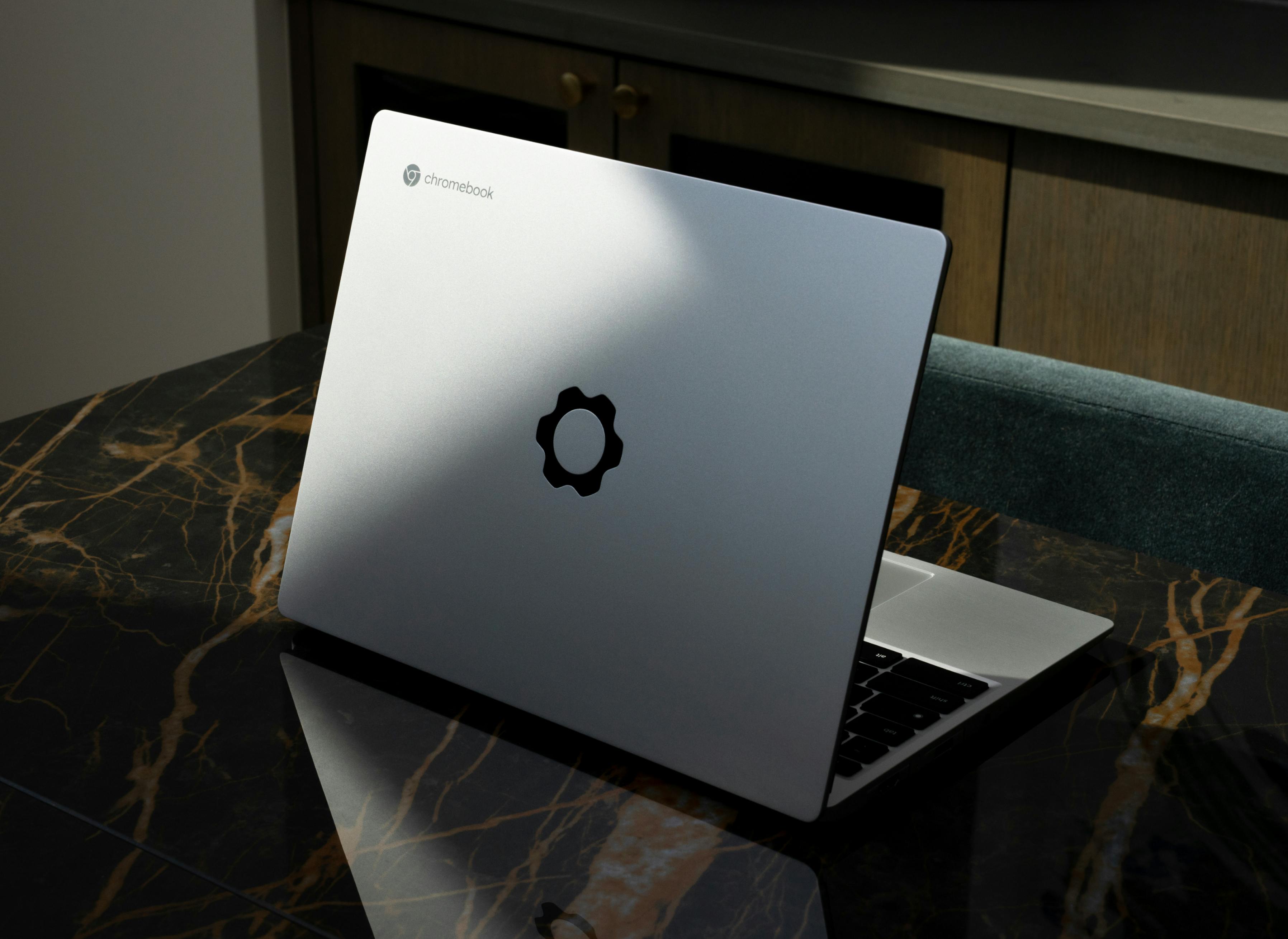
The Framework Laptop Chromebook Edition represents an ambitious fusion of repairability philosophy and ChromeOS simplicity. Powered by a 12th-gen Intel Core i5-1240P processor with 8GB RAM and a 256GB SSD, this modular Chromebook delivers strong performance alongside a distinctive 3:2 aspect ratio QHD display at 400+ nits brightness. The laptop's defining feature is its complete modularity: expansion cards slot into four Thunderbolt 4 ports, allowing users to customize which ports appear and where, while internal components like RAM and storage can be upgraded to 64GB and 1TB respectively. Framework constructed the chassis from 50 percent post-consumer recycled aluminum with recyclable packaging and carbon-offset shipping. Build quality exceeds typical Chromebook standards, with reviewers consistently praising the aluminum construction, excellent keyboard, and precision trackpad. However, the device carries a premium price point for a Chromebook and omits features common at this tier, including touchscreen support and a fingerprint sensor. Battery life tests reveal 6.5 to 10 hours depending on usage, falling short of many competing Chromebooks that regularly deliver 10 to 13 hours. ChromeOS updates are guaranteed through June 2030, providing seven years of software support from its late 2022 launch.[1][2][3][4][5][6][7][8][9]
Pros
- Complete repairability with user-accessible components and Framework-supplied replacement parts for extended device lifespan
- Swappable expansion card system allows customization of port selection and positioning across four Thunderbolt 4 slots
- Premium build quality with aluminum chassis and excellent keyboard and trackpad that rival more expensive laptops
- Strong performance from Intel Core i5-1240P processor with 4+8 cores, delivering top scores in CrXPRT 2 and Basemark Web 3.0 benchmarks
- Sustainable manufacturing with 50% recycled aluminum, 30% recycled plastic, fully recyclable packaging, and carbon-offset shipping
Cons
- Battery life ranges from 6.5 to 10 hours, significantly shorter than competing Chromebooks that achieve 10 to 13 hours
- Lacks touchscreen functionality, which is increasingly standard on premium Chromebooks in this category
- No fingerprint sensor for biometric authentication, a feature present on many competing models
- Speakers sound muffled and require 65-75% volume to achieve adequate clarity and presence
- Framework has not committed to providing motherboard upgrades for the Chromebook Edition, limiting long-term upgrade potential compared to Windows version
The Framework Laptop Chromebook Edition represents an ambitious fusion of repairability philosophy and ChromeOS simplicity. Powered by a 12th-gen Intel Core i5-1240P processor with 8GB RAM and a 256GB SSD, this modular Chromebook delivers strong performance alongside a distinctive 3:2 aspect ratio QHD display at 400+ nits brightness. The laptop's defining feature is its complete modularity: expansion cards slot into four Thunderbolt 4 ports, allowing users to customize which ports appear and where, while internal components like RAM and storage can be upgraded to 64GB and 1TB respectively. Framework constructed the chassis from 50 percent post-consumer recycled aluminum with recyclable packaging and carbon-offset shipping. Build quality exceeds typical Chromebook standards, with reviewers consistently praising the aluminum construction, excellent keyboard, and precision trackpad. However, the device carries a premium price point for a Chromebook and omits features common at this tier, including touchscreen support and a fingerprint sensor. Battery life tests reveal 6.5 to 10 hours depending on usage, falling short of many competing Chromebooks that regularly deliver 10 to 13 hours. ChromeOS updates are guaranteed through June 2030, providing seven years of software support from its late 2022 launch.[1][2][3][4][5][6][7][8][9]
Design and Build Quality
The Framework Laptop Chromebook Edition establishes a new benchmark for Chromebook construction quality through its precision-engineered aluminum chassis. The 2.87-pound body incorporates 50 percent post-consumer recycled aluminum and 30 percent recycled plastic, delivering both environmental credentials and structural rigidity that exceeds typical Chromebook standards. At 1.7 cm thick, the laptop maintains a portable profile without sacrificing durability, and the matte aluminum finish resists fingerprints while providing a professional aesthetic. Reviewers consistently note the satisfyingly tactile keyboard with no key wobble and a firm, confidence-inspiring trackpad that rivals premium Windows laptops.[9][2][8][1][7]
The 13.5-inch display employs a 3:2 aspect ratio with 2256×1504 QHD resolution and 400+ nits brightness, providing 18 percent more vertical screen space than traditional 16:9 panels. This taller format proves advantageous for document work and web browsing, though the display omits touch functionality, which represents a notable absence at this tier. The bezels surrounding the screen remain reasonably slim while housing a 1080p 60 FPS webcam that delivers clear video quality for conferencing applications.[5][3][8][7]
The defining design element remains the expansion card system, which transforms the four Thunderbolt 4 USB-C ports into customizable connection points. Users select from cards including USB-A, USB-C, HDMI, DisplayPort, MicroSD, and storage expansion, then slot them into position in seconds without tools. This modularity extends internally, where memory and storage modules can be accessed by removing five captive screws on the bottom panel.[4][2][10][7]
Performance in Real Use
The 12th-gen Intel Core i5-1240P processor with its 4 performance cores and 8 efficiency cores delivers 30 watts of sustained performance, placing it among the most capable Chromebook processors available. In benchmark testing, the Framework achieves higher CrXPRT 2 and Basemark Web 3.0 scores than competing Chromebooks equipped with the same processor, suggesting effective thermal management and power delivery. Real-world multitasking with dozens of browser tabs, Android apps, and Linux development environments proceeds smoothly without perceptible lag or thermal throttling.[3][4][10][6][1]
The Intel Iris Xe graphics handle hardware-accelerated video playback and light gaming through Steam on ChromeOS Alpha without difficulty. Video conferencing remains stable even when running concurrent applications, and the system maintains responsiveness during extended usage sessions. The 8GB of DDR4-3200 RAM proves adequate for typical ChromeOS workloads, though users engaged in demanding Android app usage or Linux development may benefit from upgrading to 16GB or 32GB, which takes minutes to accomplish.[3][6][1][7]
Storage performance from the 256GB NVMe SSD meets expectations, with fast boot times and rapid application launches characteristic of ChromeOS. Users requiring additional capacity can swap to a 1TB drive using the same straightforward upgrade process. The expansion card system demonstrates its value during extended desktop sessions, where users configure multiple display outputs, USB peripherals, and card readers simultaneously.[4][3][7]
Ease of Use
ChromeOS simplicity combines with Framework's thoughtful design to create an approachable user experience regardless of technical expertise. The expansion cards snap into place with satisfying magnetic alignment, and color-coded indicators help users identify card types at a glance. Removing cards requires pressing a release button, after which they slide out smoothly without risk of damage. Users report that swapping configurations based on location or task becomes second nature within days.[10][6][1][7]
The keyboard delivers consistent tactile feedback with adequate key travel, though some users describe the feel as slightly mushy compared to premium laptops. Key legends remain clearly visible under varied lighting conditions thanks to the integrated backlighting, and the layout follows standard conventions with minimal adjustment required. The precision trackpad supports multi-touch gestures reliably, with ChromeOS gesture navigation responding accurately to two and three-finger swipes.[18][13][11][8][1]
Internal component access requires only a standard Torx screwdriver to remove five captive screws, after which the bottom panel lifts away to reveal clearly labeled memory slots, storage bay, battery, and wireless module. Framework provides QR codes inside the chassis that link to specific repair guides and replacement part ordering pages, eliminating confusion about compatible components.[10][7]
Reliability
Limited long-term data exists given the product's late 2022 launch, though early adopter reports through mid-2025 suggest solid reliability. The expansion card mechanism shows no signs of loosening or wear after months of daily swapping, and the magnetic retention system maintains consistent holding force. Memory and storage upgrades performed by users proceed without compatibility issues when using Framework-recommended components.[14][19][7]
The speakers represent the most consistent criticism, with users reporting muffled audio that requires 65 to 75 percent volume to achieve adequate clarity. This limitation affects media consumption and video conferencing when external audio devices are unavailable. Framework's construction using post-consumer recycled materials raises no durability concerns based on current usage reports, with the aluminum chassis showing normal resistance to daily wear.[2][8][9]
ChromeOS updates through June 2030 provide seven years of software support from launch, matching Google's standard eight-year commitment. This extended support window aligns with Framework's sustainability objectives, though the company has not committed to offering motherboard upgrades that could reset the update timeline.[1][7]
Use Cases
The Framework Laptop Chromebook Edition excels in scenarios where modularity and repairability deliver tangible benefits. Professionals who move between home offices and client sites appreciate the ability to configure ports based on location, carrying only necessary expansion cards rather than dongles. Creative professionals working with SD cards and external displays benefit from hot-swapping configurations without rebooting.[10][7]
Educational institutions and IT departments gain simplified repair logistics, as Framework sells all replacement parts including displays, keyboards, and motherboards individually. This accessibility reduces downtime and extends device lifecycles beyond typical Chromebook replacement cycles. Developers using Crostini Linux environments value the upgradeable memory and storage, which can grow alongside project requirements.[14][12][10][7]
The device proves less suitable for users requiring maximum mobility, as the 6.5 to 10 hour battery life falls short of competitors achieving 10 to 13 hours. Frequent travelers depending on all-day untethered operation may find the runtime limiting. Similarly, users who depend on touchscreen interaction for note-taking or drawing face a significant limitation.[6][8][7]
Long-term Ownership Feedback
Early adopters emphasize the psychological shift that comes with owning a completely repairable device. Users report increased confidence in device longevity knowing that component failures can be addressed through straightforward replacement rather than whole-device disposal. The expansion card ecosystem proves more valuable over time as users accumulate cards for specific situations, building a personalized toolkit.[10][7]
Battery performance represents the most common long-term concern, with users noting that runtime remains consistent with initial impressions but may feel more limiting as usage patterns evolve. Some users accept this trade-off given the laptop's other attributes, while others find it incompatible with their needs. The absence of touchscreen functionality becomes more pronounced over extended use for users accustomed to touch interaction on other devices.[11][8][7]
Framework's commitment to selling replacement parts and publishing repair guides instills confidence in long-term supportability, though the company's relative youth compared to established manufacturers introduces some uncertainty about decade-long availability. Users invested in the modular philosophy view the Framework as a platform rather than a disposable device, with plans to upgrade components as needs change.[14][10][7]
| Specification | Details |
|---|---|
| Processor | 12th Gen Intel Core i5-1240P (4+8 cores, up to 4.4 GHz, 30W sustained) [3][4] |
| Display | 13.5" diagonal, 3:2 aspect ratio, 2256×1504 QHD resolution, 400+ nits brightness [3][5] |
| Graphics | Intel Iris Xe [3][5] |
| RAM | 8GB DDR4-3200 (upgradeable to 64GB) [3][4] |
| Storage | 256GB NVMe SSD (upgradeable to 1TB) [3][4] |
| Ports | Four Thunderbolt 4 USB-C ports with swappable expansion cards, 3.5mm headphone jack [3][2] |
| Camera | 1080p 60 FPS webcam [3] |
| Battery | 55Wh (80% capacity after 1000 cycles), 60W USB-C charging [3][11] |
| Weight | 2.87 pounds [7] |
| Dimensions | 1.7 x 29.8 x 22.9 cm [2] |
| Materials | 50% post-consumer recycled aluminum, 30% recycled plastic [9] |
| OS Support | ChromeOS updates through June 2030 [1][7] |
Buy
- You prioritize device longevity and want the ability to repair or upgrade components yourself without manufacturer service[10][7]
- Your workflow demands flexible connectivity, and you value choosing which ports you need rather than accepting fixed configurations[2][10]
- You work primarily near power outlets and can accommodate shorter battery runtime in exchange for modularity benefits[11][7]
- You want a Chromebook with performance capabilities for demanding ChromeOS tasks, Android apps, and Linux development[12][6]
- Environmental impact matters to you, and you prefer products with ethical manufacturing and extended usability[9][2]
Skip
- You need all-day battery life for extended mobile use away from power outlets without compromising on runtime[6][7]
- Touchscreen interaction is essential to your workflow, as this model only offers a non-touch display[8][7]
- You require biometric authentication through a fingerprint sensor for security and convenience[7]
- Budget considerations are primary, and you can find Chromebooks with similar performance at lower cost[7]
- You want assurance of future motherboard and processor upgrades, which Framework has not committed to for this model[7]
Critic Reviews
No reviews yet.
User Reviews
No reviews yet.