
The Handshake Solution: Why the J-Tech Digital V628 Remains a Budget Ergonomic Champion
Is your wrist screaming at you? The J-Tech Digital V628 offers a radical "handshake" design that prioritizes your health over flashy specs, providing a path to RSI relief without a premium price tag.
Updated February 8, 2026
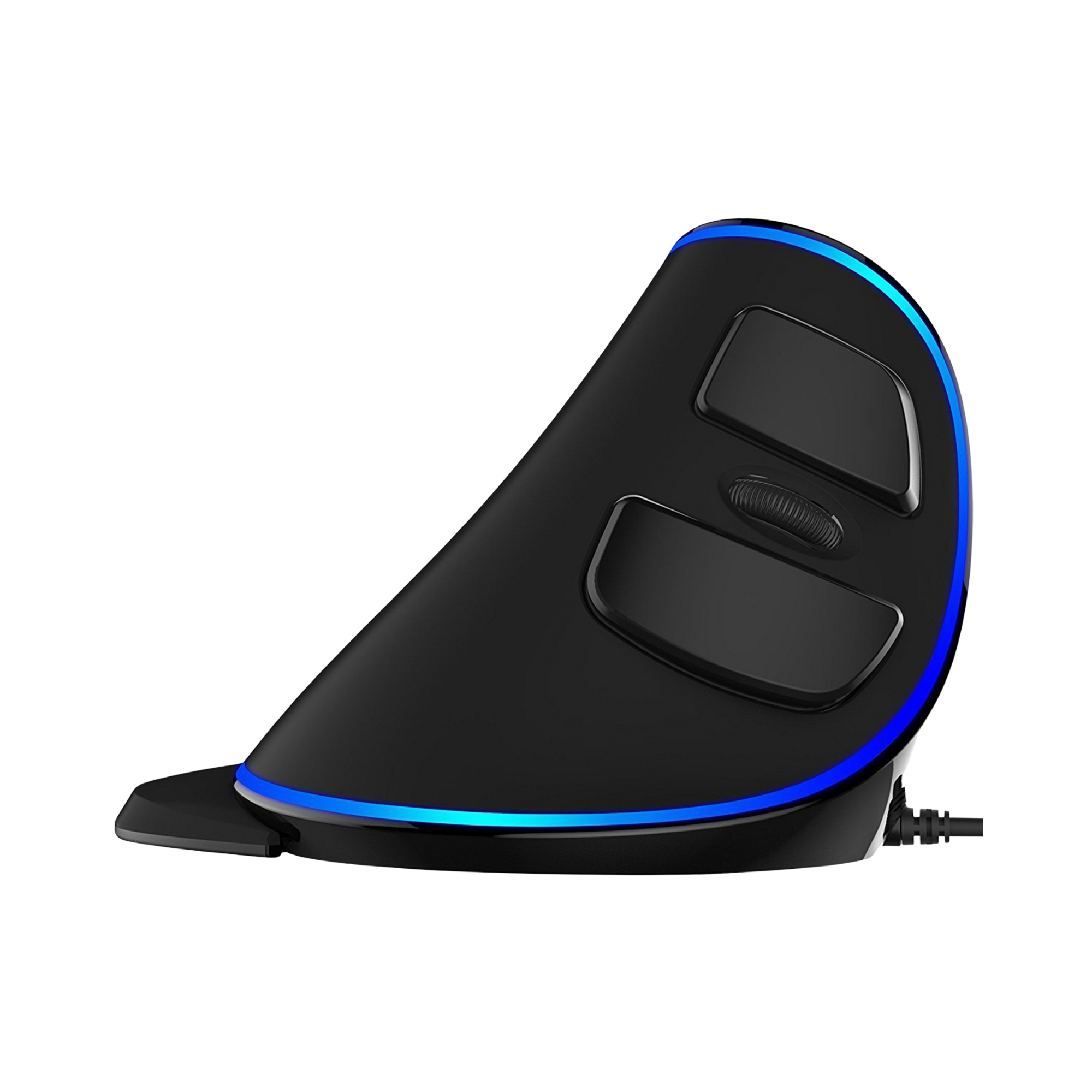
The J-Tech Digital V628 is a pioneering vertical mouse designed to combat repetitive strain injuries (RSI) and carpal tunnel syndrome. By shifting the hand into a 57-degree "handshake" position, it reduces forearm twisting. While it lacks the high-end sensors of gaming mice, its utility for office professionals and heavy computer users remains unparalleled in the budget category.
Pros
- Neutral handshake grip significantly reduces wrist pronation.
- Removable palm rest allows for customizable support and movement styles.
- Adjustable DPI settings (800/1200/1600) for varied screen resolutions.
- Tactile scroll wheel with distinct steps for precise navigation.
- Integrated thumb buttons for efficient web browsing and file management.
Cons
- Optical sensor lacks the precision required for professional-level gaming.
- Large physical footprint makes it unsuitable for compact travel bags.
- Plastic build quality can feel less premium compared to high-end rivals.
- The blue LED trim cannot be customized or easily turned off on older revisions.
- Significant learning curve for users transitioning from traditional mice.
The J-Tech Digital V628 is a pioneering vertical mouse designed to combat repetitive strain injuries (RSI) and carpal tunnel syndrome. By shifting the hand into a 57-degree "handshake" position, it reduces forearm twisting. While it lacks the high-end sensors of gaming mice, its utility for office professionals and heavy computer users remains unparalleled in the budget category.
Design and build quality
The first thing anyone notices about the J-Tech Digital V628 is its imposing silhouette. Unlike the flat, pebble-like design of a standard peripheral, the V628 stands tall like a fin. This design is rooted in anatomy; by forcing the hand into a 57-degree angle, it aligns the radius and ulna bones in the forearm, preventing the "twist" that leads to carpal tunnel issues. The build is predominantly matte ABS plastic, which offers a decent grip even during long sessions. While it lacks the premium weight of a magnesium alloy or high-end rubberized coatings, it feels sturdy enough for daily desk duty. The inclusion of a detachable palm rest is a thoughtful touch, allowing users who move their mouse with their whole arm to rest their wrist entirely on a padded-style surface.
Performance in real use
In a productivity environment—spreadsheets, coding, and web navigation—the V628 excels. The optical sensor tracks reliably on most opaque surfaces, including wood and standard mousepads. The adjustable DPI button, located conveniently on the top, allows for quick shifts between 800, 1200, and 1600 DPI. This is particularly useful for those using dual-monitor setups where a higher sensitivity is needed to traverse the screen real estate. However, it is important to manage expectations regarding gaming. While it can handle casual titles or strategy games, the sensor is not designed for the rapid "flick" movements required in first-person shooters. There is a slight lift-off distance quirk where the sensor may track for a millisecond too long when being repositioned, but for 9-to-5 office tasks, this is largely unnoticeable.
Ease of use
Transitioning to a vertical mouse is often described as "relearning how to point." For the first few days, your muscle memory will likely cause you to overreach or try to click downward rather than inward. However, the V628 is designed to make this transition intuitive. The buttons are positioned exactly where the fingers naturally rest in a handshake grip. The "Back" and "Forward" buttons are situated just above the thumb rest, requiring minimal movement to activate. The scroll wheel has a rubberized texture and a notched rotation, providing excellent tactile feedback. The biggest hurdle for most users is the physical size; this is a large mouse, and those with smaller hands may find the reach to the primary buttons slightly fatiguing until they adjust their grip.
Reliability
Long-term reliability for the V628 is surprisingly high for a budget-friendly device. Users in community forums like Reddit’s r/Ergonomics frequently report using the device for 2–3 years before seeing any degradation in switch performance. The wired version is particularly robust, as there are no internal batteries to degrade over time. The primary clicks (left and right) use standard micro-switches that maintain their "clicky" feel through millions of actuations. Some users have noted that the blue LED light can occasionally flicker or dim after several years of heavy use, but the core tracking functionality remains intact. The cable is standard PVC rather than braided, so some care should be taken to avoid sharp bends at the connector.
Use Cases
The primary use case for the V628 is medical prevention and recovery. It is a favorite among software engineers, copywriters, and data analysts who spend upwards of eight hours a day at a terminal. It is also an excellent "entry-level" vertical mouse for companies looking to provide ergonomic options to employees without committing to the triple-digit costs of higher-end brands. For students writing long papers or hobbyists who find their hands cramping after a few hours of browsing, the V628 provides an immediate physical relief that standard mice simply cannot match.
Long term ownership feedback
Community consensus on platforms like Amazon and Reddit highlights a recurring theme: "I wish I had switched sooner." Long-term owners often mention that while the plastic might get a bit "shiny" in high-contact areas over time, the relief from wrist pain is the overriding factor for their loyalty to the brand. Many users report that after six months of use, they find it difficult to go back to a standard mouse, feeling the strain immediately upon trying one. The most common long-term criticism is the lack of software for remapping buttons, which forces users to rely on third-party apps like "X-Mouse Button Control" if they want to customize the thumb buttons. Despite this, the V628 remains a top recommendation in the ergonomic community for its balance of price, comfort, and durability.
- Core features
- Vertical "Handshake" Design, Removable Palm Rest, Blue LED trim.
- Technical specifications
- 800/1200/1600 DPI, Optical Sensor, Wired USB (or 2.4G Wireless models).
- Compatibility
- Windows (XP/Vista/7/8/10/11), Linux, MacOS (standard buttons only).
- Materials
- Matte ABS Plastic, Rubberized Scroll Wheel.
Buy
- You are experiencing persistent wrist pain or forearm fatigue during work.
- You want to trial the vertical mouse form factor without a heavy investment.
- You prefer a larger mouse that fills the hand and provides a resting place for the pinky.
- You need a dedicated office peripheral that prioritizes comfort over high-speed tracking.
- You value a wired connection that eliminates battery anxiety and charging downtime.
Skip
- Your primary use case is competitive gaming where sensor polling and latency are critical.
- You have smaller-than-average hands, making the reach to buttons uncomfortable.
- You require a highly portable setup for commuting or "hot-desking."
- You prefer silent-click switches; the V628 has a standard, audible mechanical click.
- You need deep software customization for macros and RGB lighting.
Critic Reviews
No reviews yet.
User Reviews
No reviews yet.