
Lenovo Chromebook Duet 3
This 11-inch detachable ChromeOS tablet balances portability and performance with an improved processor and bright display, though cramped typing and limited multitasking hold it back.
Updated January 28, 2026
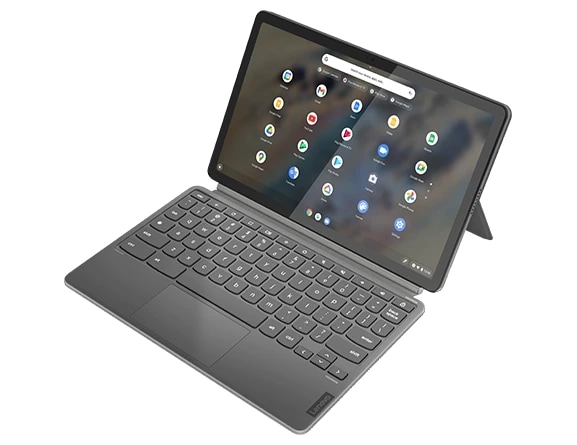
The Lenovo Chromebook Duet 3 represents a meaningful evolution from its predecessor, addressing key performance shortcomings while maintaining the compact form factor that made the original popular. Built around Qualcomm's Snapdragon 7c Gen 2 processor, this detachable 2-in-1 delivers sufficient performance for everyday ChromeOS tasks while maintaining excellent battery life. The included keyboard and kickstand eliminate the need for expensive add-ons, and the bright 2K display provides sharp visuals in a portable package. However, the compact size that enables portability also creates compromises in typing comfort and screen real estate for multitasking.[1][2][3][4][5][6]
Pros
- Significant processor upgrade from original Duet eliminates previous performance complaints
- Bright 2K display with 400 nits brightness and sharp 2000 x 1200 resolution
- Excellent battery life lasting through full workdays of light productivity tasks
- Keyboard and kickstand included in base package without additional cost
- Compact and lightweight design at 516.5g for tablet-only use
Cons
- Cramped keyboard layout causes typing discomfort during extended sessions
- Touchpad tracking issues especially around edges with inconsistent palm rejection
- Small 11-inch screen limits effective multitasking and productivity workflows
- Occasional system crashes after extended hibernation periods reported by users
- Speakers fire from sides and sound unnatural with minimal bass
The Lenovo Chromebook Duet 3 represents a meaningful evolution from its predecessor, addressing key performance shortcomings while maintaining the compact form factor that made the original popular. Built around Qualcomm's Snapdragon 7c Gen 2 processor, this detachable 2-in-1 delivers sufficient performance for everyday ChromeOS tasks while maintaining excellent battery life. The included keyboard and kickstand eliminate the need for expensive add-ons, and the bright 2K display provides sharp visuals in a portable package. However, the compact size that enables portability also creates compromises in typing comfort and screen real estate for multitasking.[1][2][3][4][5][6]
Design and Build Quality
The Lenovo Chromebook Duet 3 maintains the detachable tablet design philosophy established by its predecessor while introducing refined construction elements. The device features a two-tone fabric-covered back panel that magnetically attaches to the tablet, providing a kickstand with an improved hinge mechanism that feels sturdier than the original model. The 11-inch tablet measures 10.16 inches by 6.48 inches with a thickness of just 0.31 inches, making it exceptionally portable at 516.5 grams for the tablet alone. The bezels surrounding the display have been narrowed compared to the first-generation Duet, resulting in 15.8 percent more screen area in a similar footprint.[13][6][7][8][1]
Build materials reflect the device's positioning as an affordable ChromeOS option. The tablet chassis feels solid during regular use, though accessing internal components would cause damage as the unit relies primarily on adhesive construction. The magnetic connection between the keyboard, back cover, and tablet proves reliable during normal handling, with the kickstand supporting angles from nearly flat for stylus work up to approximately 180 degrees. The fabric covering on the back provides grip and protection while maintaining a lightweight profile, though the material may show wear over extended periods. Available colorways include Storm Gray and Misty Blue, with both featuring the same two-tone aesthetic.[6][4][7][8][1]
The included keyboard attaches magnetically to the bottom edge of the tablet and folds flat for transport. Unlike premium detachables that sell accessories separately, Lenovo includes both the keyboard and kickstand back cover in the base package, significantly enhancing value. A magnetic pen holder slot integrates into the back cover for users who purchase a compatible USI stylus, though removing and reattaching this holder can prove difficult. The compact form factor that enables single-handed tablet use necessarily creates compromises in keyboard size, with reviewers consistently noting the cramped key spacing.[3][4][5][9][1]
Performance in Real Use
The Qualcomm Snapdragon 7c Gen 2 processor represents a substantial upgrade from the original Duet's MediaTek chipset, eliminating the sluggishness that plagued the first generation. This ARM-based system-on-chip operates at up to 2.55GHz with eight Kryo 468 cores and integrated Adreno 618 graphics. In practical testing, the processor handles typical ChromeOS workflows without significant slowdown, including launching applications, switching between multiple Chrome tabs, and streaming video content simultaneously. One user reported successfully managing 20 to 30 browser tabs alongside Google Sheets and various web-based software platforms while connected to a 4K external monitor.[16][6][7][8][3][1]
The available memory configurations of 4GB or 8GB LPDDR4X RAM significantly impact multitasking capability. Reviewers testing the 8GB variant noted occasional slowdowns when pushing beyond a dozen active browser tabs with multiple applications running, while the 4GB model shows limitations more readily during heavy multitasking. The ARM architecture restricts compatibility to ChromeOS applications, Android apps from the Google Play Store, and web-based tools, preventing use of x86 Windows software. This limitation proves inconsequential for users working primarily with cloud-based productivity suites but represents a dealbreaker for those requiring specialized desktop applications.[4][6][9][1]
Storage performance reflects the constraints of eMMC technology rather than faster NVMe solid-state drives found in premium devices. The 64GB and 128GB storage options show slower read and write speeds during benchmark testing, though ChromeOS's lightweight nature and emphasis on cloud storage mitigate the impact during typical use. Graphics capabilities suit Android mobile games from the Google Play Store but cannot handle demanding PC gaming titles, with the 60Hz display refresh rate and ARM architecture limiting gaming scenarios. Thermal management proves excellent due to the fanless design, with heat dissipation occurring through the tablet chassis without affecting the keyboard portion.[6][4][1]
Ease of Use
The detachable form factor delivers genuine versatility for users transitioning between laptop and tablet modes. The magnetic attachment system allows quick separation of the keyboard when tablet functionality becomes more appropriate, such as during media consumption in cramped spaces or when using Android applications designed for touch interaction. The 10.95-inch IPS display with 2000 x 1200 resolution provides sharp text rendering and adequate brightness at 400 nits for most indoor environments. Outdoor visibility remains acceptable in moderate sunlight, though direct overhead lighting causes glare due to the glossy screen finish.[8][3][6][1]
The keyboard presents the most significant usability compromise in the Duet 3's design. The compact dimensions necessary for portability result in cramped key spacing that feels uncomfortable during extended typing sessions, with multiple reviewers noting fatigue after prolonged use. Key travel reaches adequate depth and stability remains acceptable, but the high actuation force required for keystrokes contributes to typing discomfort. The touchpad proves even more problematic, with poor tracking accuracy especially near the edges and inconsistent palm rejection causing cursor jumps during typing. Dragging and dropping operations feel imprecise, and only the bottom half of the touchpad responds to physical clicks.[9][4][1]
ChromeOS setup and operation require minimal technical knowledge, with users reporting nearly instantaneous configuration processes. The operating system's integration with Google services streamlines access to email, document editing, and cloud storage for users already invested in that ecosystem. The 5-megapixel front-facing camera delivers surprisingly good image quality for video conferencing, with natural colors and good detail despite slight overexposure. The dual USB-C ports represent an improvement over the single-port original Duet, allowing simultaneous charging and peripheral connection without requiring a hub. However, the absence of a 3.5mm headphone jack forces reliance on Bluetooth audio or USB-C adapters not included with the device.[17][16][15][3][4][9][1]
Reliability
Long-term user reports reveal mixed reliability experiences with the Chromebook Duet 3. Several users documented occasional system crashes and unexpected restarts, particularly after extended hibernation periods exceeding 12 hours. One reviewer characterized these stability issues as "minor frustrations" rather than critical failures, noting that the device performs reliably during active use. Another user in Germany reported more serious reliability concerns, including sluggish tablet mode performance requiring multiple fingertip contacts to register touches and frequent random crashes necessitating system restarts.[11][10][1]
The six-month follow-up review from Android Digest found the device holding up well through daily use, with keyboard cover showing minimal wear and only minor touchpad responsiveness issues developing over time. The magnetic attachments for the keyboard and back cover maintained their strength without loosening, and the kickstand hinge remained functional without developing excessive play. Battery health appears stable across extended ownership periods, with users reporting consistent all-day performance from the 29Wh battery during typical productivity workflows.[5][7][1]
ChromeOS update support extending to June 2030 provides considerable longevity for the platform, ensuring security patches and feature updates for approximately eight years from the device's 2022 release. Google's track record of occasionally extending support dates beyond initial commitments adds potential additional value. The eMMC storage shows no signs of degradation in reported long-term use cases, though its slower performance compared to SSD technology remains constant throughout ownership. The non-upgradeable nature of soldered RAM and storage means the configuration purchased determines long-term capability, with the 4GB RAM variant showing more performance limitations as software demands increase.[4][6][1]
Use Cases
The Chromebook Duet 3 excels as a secondary computing device for users with primary desktop or laptop systems. Its portability makes it ideal for couch computing, travel scenarios, and situations where a full-sized laptop proves unnecessarily bulky. Students find value in the combination of tablet flexibility for note-taking with stylus support and laptop functionality for essay writing and research, though the cramped keyboard limits its suitability for extended assignments. The lightweight design and all-day battery life suit commuters and mobile professionals working primarily with web-based tools and communication platforms.[15][5][8][9][4]
Media consumption represents another strong use case, particularly with the keyboard detached for handheld viewing. The 2K display resolution provides sharp video playback, and the compact size fits comfortably in airplane seats and other confined spaces. However, the underwhelming speaker quality with minimal bass response and side-firing orientation limits audio performance, making external speakers or headphones preferable for critical listening. The 8-megapixel rear camera enables basic photography and document scanning, though image quality remains secondary to smartphone capabilities.[3][6][8][4][1]
The device serves adequately as a primary computer for users with modest computing needs centered on web browsing, email, document editing, and video streaming. The small screen size constrains productivity workflows requiring extensive multitasking or reference material displayed alongside active work. Professional use cases limited to cloud-based software platforms can function on the Duet 3, as demonstrated by the user managing extensive browser tabs and SaaS applications. The USI stylus support enables digital note-taking and basic drawing, though Lenovo's official stylus requires separate purchase and competing premium devices offer superior pen experiences.[16][2][8][9][4][1]
Parents seeking affordable educational technology for younger students find the Duet 3 appropriate for homework and learning applications, with the touch interface supporting educational apps from the Google Play Store. The included keyboard eliminates additional accessory costs that significantly increase total investment in competing tablet platforms. However, students in technical fields requiring specialized software or extensive computational power need more capable hardware. The device proves inadequate for business users requiring Windows compatibility, extensive local storage, or professional-grade peripherals.[12][5][15][3][4][1]
Long-term Ownership Feedback
Consumer sentiment remains predominantly positive among users who purchased the Duet 3 with realistic expectations aligned to its capabilities. Best Buy customer reviews frequently emphasize satisfaction with battery life, portability, and ease of use for intended tasks. One verified purchaser noted never regretting the Duet 3 purchase after returning the more expensive Duet 5, finding the smaller model better suited to actual usage patterns. The value proposition resonates strongly with budget-conscious buyers, who appreciate receiving a complete functional package without additional accessory purchases.[5][14][15]
Critical long-term feedback centers on the inherent limitations of the compact form factor rather than quality degradation. Users who initially underestimated the impact of the small keyboard and limited screen space for multitasking express greater disappointment in extended ownership reviews. The touchpad issues documented in initial reviews persist rather than improve with familiarity, remaining a consistent frustration point for users relying heavily on cursor-based navigation. Some users report developing workarounds such as keeping a Bluetooth mouse available for precision tasks.[10][16][15][9][4][1]
The stability concerns documented by some users create uncertainty about consistency across production batches or software versions. While many owners report reliable operation, the documented crashes after hibernation and occasional unresponsiveness in tablet mode suggest quality control variability or software optimization issues. The fanless design ensures silent operation without cooling system degradation, and the absence of moving parts beyond the kickstand hinge reduces potential mechanical failure points. The magnetic attachment system maintains functionality without loosening over time based on available long-term reports.[11][7][10][4][1]
| Specification | Details |
|---|---|
| Display | 10.95-inch IPS, 2000 x 1200 resolution, 400 nits brightness, 60Hz refresh rate [6][1] |
| Processor | Qualcomm Snapdragon 7c Gen 2 (up to 2.55GHz, 8x Kryo 468 CPU) [6][1] |
| Graphics | Qualcomm Adreno 618 integrated GPU [6][1] |
| Memory | 4GB or 8GB LPDDR4X-2133MHz (soldered) [6][1] |
| Storage | 64GB or 128GB eMMC (non-expandable) [6][1] |
| Cameras | 5MP front-facing fixed focus, 8MP rear-facing autofocus [6][1] |
| Connectivity | WiFi 5 802.11AC (2x2), Bluetooth 5.1, optional LTE [6][1] |
| Ports | 2x USB-C 3.2 Gen 1 (5Gbps) [6][1] |
| Battery | 29Wh non-removable, up to 45W charging support [6][1] |
| Weight | 516.5g tablet only, additional weight with keyboard and cover [6][1] |
| Dimensions | 10.16" x 6.48" x 0.31" [13][6] |
| Operating System | ChromeOS with updates guaranteed until June 2030 [1][6] |
| Stylus Support | USI (Universal Stylus Initiative) pen support, Lenovo Digital Pen sold separately [6][9] |
Buy
- Students or mobile workers needing lightweight ChromeOS device with tablet versatility[8][4]
- Users wanting affordable alternative to Android tablets with full desktop browser capabilities[12][8]
- Secondary device users who prioritize portability over full laptop functionality[5][9]
- Budget-conscious buyers seeking complete package with included keyboard and case[3][5]
- Users who primarily work with web-based applications and light productivity tools[7][1]
Skip
- Professionals requiring extensive multitasking across multiple applications simultaneously[2][4]
- Writers or content creators needing comfortable keyboard for extended typing sessions[1][4]
- Users requiring x86 Windows application compatibility for specialized software[4][1]
- Media consumers wanting high-quality audio without external speakers[1][4]
- Users needing more than two USB-C ports or requiring headphone jack connectivity[9][1]
Critic Reviews
No reviews yet.
User Reviews
No reviews yet.