
Lenovo Chromebook Duet 5
This 13.3-inch detachable Chromebook delivers a stunning OLED display and exceptional battery life in a portable package, though its ARM processor limits heavy workloads and responsiveness issues occasionally frustrate everyday use.
Updated January 28, 2026
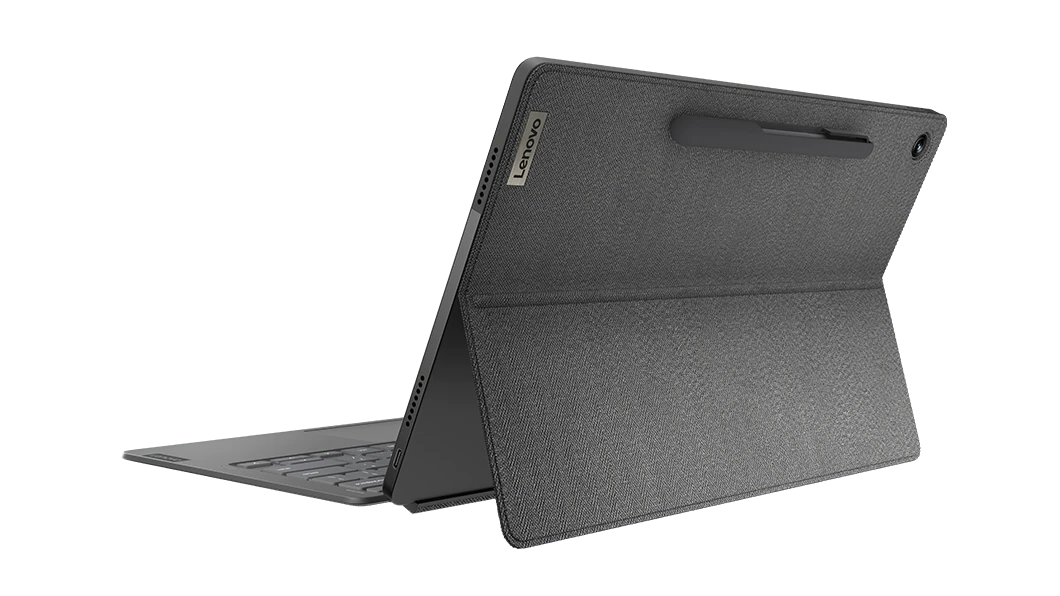
The Lenovo Chromebook Duet 5 represents a thoughtful evolution in detachable Chrome OS devices, pairing premium build quality with a standout 13.3-inch OLED display that punches well above its weight class. The device ships with a magnetic keyboard and kickstand cover included, transforming from tablet to laptop mode seamlessly. At its core sits a Qualcomm Snapdragon 7c Gen 2 processor paired with 8GB of RAM, delivering adequate performance for web browsing, document editing, and media streaming while maintaining battery life that routinely exceeds 10 hours of continuous use. The full HD OLED panel supports 100% DCI-P3 color coverage and reaches 400 nits brightness, flanked by quad speakers that enhance the media consumption experience. This convertible Chromebook serves mainstream users well, particularly those prioritizing portability and screen quality over raw computing power, though its ARM-based architecture and occasional input responsiveness issues reveal limitations that power users should carefully consider.[1][2][3][4][5][6]
Pros
- Stunning 13.3-inch OLED display with full DCI-P3 color coverage and deep blacks delivers exceptional media viewing quality
- Outstanding battery life exceeding 10 hours of continuous use with some users reporting 15+ hours in mixed workloads
- Premium build quality featuring metal edges and rigid plastic construction that feels more expensive than typical Chromebooks
- Quad speaker system provides bright, clear audio that significantly outperforms competing detachable Chromebooks
- Full-sized keyboard included in the package offers comfortable typing with minimal flexing during lap use
Cons
- Trackpad and touchscreen suffer from inconsistent responsiveness with cursor jumping and delayed input registration
- Snapdragon 7c Gen 2 processor delivers only adequate performance that struggles with heavy multitasking or demanding applications
- Kickstand design creates wobble during lap use and lacks the stability of traditional clamshell laptops
- Limited port selection with only two USB-C ports and no headphone jack or expandable storage
- Software update issues have historically left devices stuck on older Chrome OS versions requiring firmware fixes
The Lenovo Chromebook Duet 5 represents a thoughtful evolution in detachable Chrome OS devices, pairing premium build quality with a standout 13.3-inch OLED display that punches well above its weight class. The device ships with a magnetic keyboard and kickstand cover included, transforming from tablet to laptop mode seamlessly. At its core sits a Qualcomm Snapdragon 7c Gen 2 processor paired with 8GB of RAM, delivering adequate performance for web browsing, document editing, and media streaming while maintaining battery life that routinely exceeds 10 hours of continuous use. The full HD OLED panel supports 100% DCI-P3 color coverage and reaches 400 nits brightness, flanked by quad speakers that enhance the media consumption experience. This convertible Chromebook serves mainstream users well, particularly those prioritizing portability and screen quality over raw computing power, though its ARM-based architecture and occasional input responsiveness issues reveal limitations that power users should carefully consider.[1][2][3][4][5][6]
Design and Build Quality
The Lenovo Chromebook Duet 5 establishes a premium presence through thoughtful material selection and construction methods that exceed typical Chrome OS tablet expectations. The tablet chassis features metal edges surrounding a 13.3-inch display panel, while the rear panel employs rigid plastic with a textured finish that resists fingerprints and provides secure grip during handheld use. The compact power button integrates smoothly into the device's profile, and volume controls utilize silicone coating for tactile feedback that makes blind operation straightforward. The included keyboard attaches magnetically to the tablet's bottom edge in landscape orientation, creating a laptop configuration that feels substantially more cohesive than earlier detachable Chromebook attempts.[1][5]
The keyboard cover itself deserves particular attention for its engineering approach. Rather than relying solely on magnets for stability, Lenovo incorporates a heavy-duty fabric hinge that connects the kickstand portion to the keyboard base. This design choice results in noticeably improved stability compared to competing detachables like the Pixel Slate, though some wobble persists during typing on uneven surfaces. The full-sized key layout avoids the cramped feeling common in compact devices, and key travel registers as adequate for extended typing sessions despite producing a slightly hollow acoustic signature. Palm rest rigidity represents a significant improvement over alternatives like the HP Chromebook X2 11, eliminating the accidental trackpad clicks that plague devices with excessive flex.[1]
The kickstand mechanism provides adjustable viewing angles through its fabric construction, though this flexibility introduces compromises in lap stability. Users report difficulty achieving balanced positioning when using the device on their lap, as the kickstand tends to bend sideways depending on leg position and posture. This limitation makes the Duet 5 more suitable for desk and table use than true lap computing, contradicting the portable laptop aspirations some users bring to detachable form factors. The overall weight distribution concentrates mass in the tablet portion, causing the lightweight keyboard to provide insufficient counterbalance during typing, which contributes to the wobble issue.[5][6]
Performance in Real Use
The Qualcomm Snapdragon 7c Gen 2 processor positions the Duet 5 firmly in the mainstream performance tier rather than competing with premium Chromebooks featuring Intel or AMD silicon. The eight-core ARM chip running at 2.55 GHz handles typical Chrome OS workflows competently, including web browsing with a dozen tabs, Google Workspace applications, and Android app execution. Users who maintain realistic expectations for ARM-based computing report satisfaction with everyday responsiveness, particularly for document editing, email management, and video conferencing. The 8GB RAM configuration provides adequate headroom for multitasking within Chrome OS constraints, though users attempting to push beyond typical productivity scenarios encounter performance ceilings quickly.[3][1][10]
Real-world performance assessments reveal notable variability in user experience based on workload complexity and expectations. Some reviewers found the device adequately responsive for professional work, noting only occasional slowdowns compared to higher-powered alternatives. Conversely, other evaluators characterized performance as frustratingly slow, with applications frequently displaying "not responding" messages and extended load times. This divergence likely stems from differences in software configuration, background process load, and individual tolerance for ARM processor limitations. Several users discovered that performing a factory reset resolved severe performance issues, suggesting software optimization problems rather than fundamental hardware inadequacy.[18][13][5][1]
The Qualcomm Adreno 618 GPU handles Chrome OS interface rendering smoothly, with gesture navigation and window management animations displaying without stutter in most scenarios. However, graphics-intensive tasks including gaming, video editing, and 3D rendering exceed the capabilities of this integrated graphics solution. The ARM architecture also introduces compatibility limitations with certain Android applications and Linux software, requiring users to verify specific application support before committing to the platform. Web-based workflows prove most successful on this hardware configuration, aligning with Google's vision for cloud-centric computing.[12][18][4][10]
Ease of Use
The touchscreen interface presents the most significant usability challenge across user reports. Multiple reviewers documented cursor jumping behavior when using the trackpad, with the pointer teleporting between screen positions rather than moving smoothly. Touch sensitivity registers as inconsistent, frequently requiring multiple taps to register input on buttons and links. This responsiveness issue creates particular frustration when using virtual keyboards or interacting with applications featuring dense interface elements. The trackpad click mechanism produces audible noise while tapping to click often fails to register, forcing users to physically depress the trackpad surface for reliable input.[4][5]
Touchscreen lag compounds these input difficulties, with noticeable delay between finger contact and on-screen response during swipes and taps. Several users compared the touch responsiveness unfavorably to tablets from a decade earlier, highlighting the disconnect between premium display quality and subpar input handling. The glossy OLED screen finish exacerbates these issues by showing fingerprints prominently and reflecting ambient light sources, though the 400-nit brightness specification provides adequate compensation in most indoor environments. Outdoor visibility suffers in bright sunlight despite the OLED panel's inherent contrast advantages.[5][1][4]
Chrome OS software updates have historically created additional ease-of-use complications for Duet 5 owners. A significant firmware issue prevented devices from updating beyond Chrome OS version 116 for an extended period, leaving users without security patches and feature updates. The problem stemmed from USB-C port firmware conflicts that required vendor collaboration to resolve. While fixes eventually deployed, this incident illustrates the potential for hardware-specific software problems in ARM-based Chrome OS devices. Users also report color space switching during video playback, with the display shifting color profiles when playback controls appear or volume adjustments occur.[9][11]
Reliability
Long-term reliability feedback generally trends positive for users operating within the device's intended use parameters. The hardware construction demonstrates durability appropriate for daily portable use, with the metal frame protecting the display panel from flexing damage. The magnetic keyboard attachment mechanism maintains secure connection over extended use periods without weakening, and the fabric hinge continues functioning through repeated folding cycles. Battery health appears to retain capacity well beyond typical warranty periods, with users reporting sustained all-day operation after years of ownership.[19][7][11][1]
However, specific reliability concerns emerge in USB-C port functionality and software stability. The firmware issue affecting Chrome OS updates revealed potential for both USB-C ports to become non-functional, leaving affected devices displaying "Something went wrong" error screens. While Lenovo and Google collaborated on firmware fixes, this incident raised questions about quality control processes and long-term support commitment. Some users experienced the firmware problem resulting in temporarily unusable devices until manual recovery procedures restored functionality.[9]
Software reliability varies significantly based on configuration and usage patterns. Users running the device with minimal installed applications and extensions report stable operation with infrequent crashes. Conversely, owners who sync extensive Chrome profiles across devices or install numerous Android applications encounter frequent application freezes and system unresponsiveness. The eMMC storage technology employed in the Duet 5 contributes to slower read/write speeds compared to SSD-equipped alternatives, which may influence application loading reliability. Reddit discussions suggest power washing the device resolves many persistent software stability issues, indicating configuration factors play significant roles in reliability perception.[14][13][18][2]
Use Cases
Media consumption represents the Duet 5's strongest use case alignment. The 13.3-inch OLED display with 100% DCI-P3 color coverage delivers vibrant, accurate colors that enhance video streaming quality across Netflix, YouTube, and similar platforms. The quad speaker configuration produces audio output that significantly exceeds expectations for a detachable tablet, with sufficient volume and clarity for casual viewing without headphones. Users consistently praise the device for extended video watching sessions, with the exceptional battery life enabling marathon viewing without charging anxiety. The 16:9 aspect ratio matches standard video content perfectly, eliminating letterboxing that affects tablets with different screen proportions.[8][2][1][4][10]
Educational applications suit the Duet 5's capabilities well, particularly for students working primarily with web-based learning platforms and Google Workspace. The included keyboard eliminates additional accessory costs while the touchscreen and USI stylus support enable note-taking and annotation workflows. The lightweight construction facilitates transport between classes, and the all-day battery eliminates the need to carry charging cables. However, students requiring specialized software for engineering, design, or scientific computing should carefully evaluate ARM processor compatibility before purchase.[3][1][4][10]
Cloud-based productivity workflows thrive on this hardware configuration. Users operating primarily through web applications including Gmail, Google Docs, Sheets, and cloud storage services report smooth performance that meets professional requirements. The display size provides comfortable workspace for document editing and spreadsheet manipulation without feeling cramped. Split-screen and floating window capabilities enable simultaneous reference material viewing and note-taking, with some users developing sophisticated multi-window workflows leveraging the screen real estate. Remote workers relying on video conferencing platforms benefit from the excellent webcam quality that RTINGS specifically highlighted.[12][11][4][10]
Long Term Ownership Feedback
Owners maintaining realistic expectations for ARM-based Chrome OS computing generally express sustained satisfaction over multi-year ownership periods. The device continues receiving Chrome OS updates through its supported lifecycle, with most users experiencing stable operation after the initial USB-C firmware issues resolved. The OLED display maintains visual quality without noticeable degradation or burn-in concerns reported in user forums. Battery longevity remains a consistent highlight in long-term reviews, with devices approaching three years of age still delivering workday-length operation on single charges.[19][7][9][2]
Value perception strengthens over extended ownership as users discover the versatility inherent in the tablet-laptop hybrid format. Several owners initially struggled with the large tablet size but later adapted their usage patterns to leverage the screen area through multi-window configurations. The addition of accessories like hand straps improves tablet-mode ergonomics for users willing to customize the experience. The detachable keyboard proves particularly valuable for users who alternate between content creation and content consumption throughout their workflow.[11][10]
Critical long-term perspectives focus on performance limitations becoming more apparent as software demands increase over time. Users who initially found performance adequate sometimes report frustration as newer Chrome OS versions and web applications require more processing power. The lack of upgradeability means the Snapdragon 7c Gen 2 processor remains fixed at purchase specifications while software requirements evolve. The eMMC storage technology similarly shows its age compared to contemporary devices offering NVMe SSD options. Some long-term owners recommend the Duet 5 primarily as a secondary device rather than a primary computer, acknowledging its strengths while recognizing computational boundaries.[13][19][6][1][4]
| Specification | Details |
|---|---|
| Processor | Qualcomm Snapdragon 7c Gen 2, 8-core, up to 2.55 GHz [1][14] |
| Graphics | Qualcomm Adreno 618 GPU [1][14] |
| Memory | 8GB LPDDR4 RAM [2][3] |
| Storage | 128GB eMMC Flash [2][14] |
| Display | 13.3-inch OLED, 1920 x 1080 (FHD), 400 nits brightness, 100% DCI-P3, 16:9 aspect ratio [1][14] |
| Audio | Quad speakers, 1W x 4 [15][8] |
| Ports | 2x USB-C 3.2 Gen 1 [15] |
| Connectivity | Wi-Fi 5 (802.11ac) 2x2, Bluetooth 5.1 [15] |
| Battery | 42Wh integrated battery [15][8] |
| Weight | Tablet: 700g / With keyboard: 920g [4] |
| Operating System | Chrome OS [14] |
| Stylus Support | USI stylus compatible [1][4] |
Buy
- You prioritize media consumption and want an excellent display with vibrant colors for streaming content[2][8]
- You need all-day battery life that reliably lasts through extended work or school sessions without charging[10][3]
- You want a lightweight, portable device that transitions between tablet and laptop modes for varied use cases[11][1]
- You work primarily with web-based applications and cloud services rather than demanding local software[12][10]
- You value premium build quality and design in a Chrome OS device at a competitive price point[7][1]
Skip
- You need strong performance for multitasking with numerous browser tabs or running Android apps simultaneously[13][5]
- You frequently work on your lap and require a stable, wobble-free typing experience[5][6]
- You depend on precise trackpad and touchscreen input for design work or detailed cursor positioning[4][5]
- You require compatibility with x86 Windows applications that won't run on ARM-based Chrome OS[4]
- You need multiple ports for connecting accessories, external displays, and peripherals regularly[6]
Critic Reviews
No reviews yet.
User Reviews
No reviews yet.