
Lenovo IdeaPad Duet 5 Chromebook
A 13.3-inch detachable Chromebook that delivers exceptional battery life and a gorgeous OLED screen for mainstream users who prioritize portability and media consumption over raw computing power.
Updated January 28, 2026
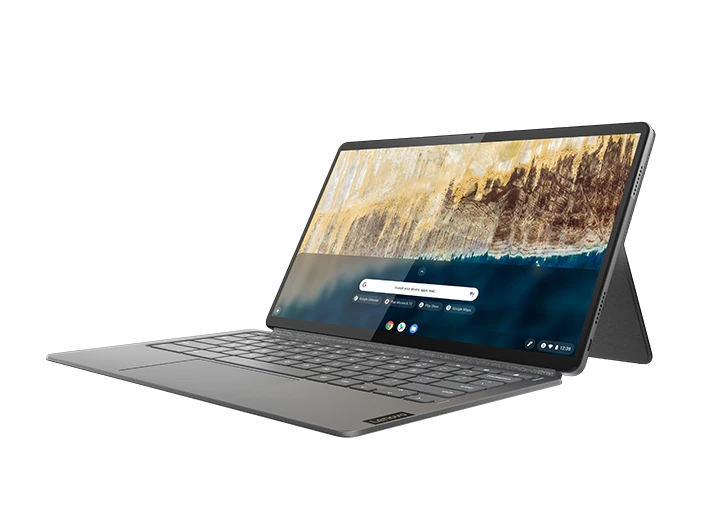
The Lenovo IdeaPad Duet 5 Chromebook stands as an impressive evolution in Chrome OS tablets, combining a brilliant 13.3-inch OLED display with genuine all-day battery life in a versatile 2-in-1 package. While its Snapdragon 7c Gen 2 processor won't satisfy power users, the device excels at web browsing, content consumption, and light productivity tasks that define mainstream computing. The included keyboard and kickstand transform this tablet into a legitimate laptop replacement for students and casual users, though its detachable design brings inherent stability compromises compared to traditional clamshell Chromebooks. With software updates guaranteed until 2029, premium build quality typically reserved for higher-priced devices, and an OLED panel that punches well above its weight class, the Duet 5 represents exceptional value for users who understand its performance boundaries.[1][2][3][4][5][6][7]
Pros
- Stunning 13.3-inch FHD OLED display with 400 nits brightness and inky blacks delivers exceptional visual quality for media consumption
- Outstanding battery life exceeding 13 hours of continuous use enables all-day productivity without charging
- Premium build quality featuring aluminum and rigid plastic construction that feels more expensive than its category
- Full-size keyboard and kickstand included in the box provides complete 2-in-1 functionality without additional purchases
- Guaranteed Chrome OS updates until June 2029 ensures long-term software support and security
Cons
- Snapdragon 7c Gen 2 processor struggles with multitasking beyond moderate tab counts and lacks power for demanding applications
- Detachable kickstand design creates instability during lap use and can feel flimsy compared to convertible 2-in-1s
- No 3.5mm headphone jack forces reliance on USB-C adapters or Bluetooth audio
- Trackpad suffers from inconsistent responsiveness and cursor tracking issues reported across multiple reviews
- Limited port selection with only two USB-C connections requires dongles for peripheral connectivity
The Lenovo IdeaPad Duet 5 Chromebook stands as an impressive evolution in Chrome OS tablets, combining a brilliant 13.3-inch OLED display with genuine all-day battery life in a versatile 2-in-1 package. While its Snapdragon 7c Gen 2 processor won't satisfy power users, the device excels at web browsing, content consumption, and light productivity tasks that define mainstream computing. The included keyboard and kickstand transform this tablet into a legitimate laptop replacement for students and casual users, though its detachable design brings inherent stability compromises compared to traditional clamshell Chromebooks. With software updates guaranteed until 2029, premium build quality typically reserved for higher-priced devices, and an OLED panel that punches well above its weight class, the Duet 5 represents exceptional value for users who understand its performance boundaries.[1][2][3][4][5][6][7]
Design and Build Quality
The Lenovo IdeaPad Duet 5 Chromebook presents a surprisingly premium design that defies typical expectations for detachable Chrome OS devices. The 13.3-inch tablet chassis combines aluminum edges with rigid plastic backing that delivers structural integrity without excessive weight, coming in at approximately 2.24 pounds with the keyboard attached. The metal edges provide a high-quality tactile experience while the plastic rear panel maintains durability without adding bulk that would compromise portability. Build quality consistently impresses reviewers who note the device looks and feels like a more expensive product than its category positioning suggests.[1][4][5]
The detachable keyboard mechanism uses magnetic connections that create secure attachment while allowing effortless separation when tablet mode becomes preferable. The fabric-covered keyboard adds a soft-touch premium element, though long-term users report potential wear on this material after extended ownership. The integrated kickstand provides adjustable viewing angles and solid support on flat surfaces, yet represents the design's most significant compromise. The kickstand construction feels less robust than alternatives and creates stability issues during lap computing where weight distribution causes wobbling and inconsistent positioning.[19][9][7][6][12]
Physical controls include a small but well-placed power button and volume rockers that intelligently swap orientation based on how the tablet is held in portrait or landscape modes. The device includes two USB-C ports positioned for versatility, though the absence of additional connectivity options including a 3.5mm headphone jack forces users toward dongles or Bluetooth audio solutions. The quad-speaker array flanking the display delivers surprisingly capable audio output for media consumption, positioning speakers to work effectively in both tablet and laptop configurations.[16][3][1][8][6]
Performance in Real Use
The Qualcomm Snapdragon 7c Gen 2 processor at the heart of the Duet 5 defines clear performance boundaries that separate satisfied users from frustrated ones. For web browsing with moderate tab counts, Google Workspace applications, and standard productivity tasks, the ARM-based chip delivers adequate responsiveness that meets mainstream computing needs without noticeable lag. Users report smooth performance when operating within these parameters, handling email, document editing, and content consumption without the constant waiting that characterizes under-powered devices. The 8GB RAM configuration provides sufficient memory for typical Chrome OS workflows, allowing reasonable multitasking without constant tab reloading.[20][19][1][10][6]
Performance degradation becomes apparent when users exceed these moderate use cases. Opening numerous browser tabs simultaneously or running multiple demanding Android applications triggers noticeable slowdowns and occasional stuttering. Heavy multitaskers who routinely maintain dozens of active tabs will find the Snapdragon processor struggling to maintain smooth operation. The Adreno 618 integrated graphics deliver basic capability for casual Android gaming but stumble with graphically demanding titles, limiting the device's entertainment versatility beyond video streaming.[19][9][10][6]
The eMMC storage solution provides adequate speed for Chrome OS's lightweight architecture but falls well below SSD performance standards. File transfers and large app installations take noticeably longer than competing devices with solid-state storage, though day-to-day web-based operations remain reasonably responsive since Chrome OS minimizes local storage dependency. Geekbench 5 scores of 1,727 place the Duet 5 ahead of some competing ARM Chromebooks but substantially behind the category average, quantifying its position as a capable mainstream device rather than a performance leader.[4][6]
Ease of Use
Chrome OS integration delivers the straightforward user experience that defines Google's operating system philosophy. Setup takes minutes for users already embedded in Google's ecosystem, with automatic synchronization of Drive files, Gmail, and Chrome browser preferences creating immediate familiarity. The operating system's lightweight nature contributes to perceived responsiveness even on the Snapdragon processor, with minimal background processes and cloud-centric workflows reducing local processing demands. Android app support through the Google Play Store expands functionality beyond web applications, though compatibility remains inconsistent with some apps failing to optimize for the 13.3-inch display or keyboard input.[13][7][6]
The full-size keyboard represents a substantial improvement over the cramped layout of the original 10-inch Duet model. Key travel feels adequate for extended typing sessions, and the layout avoids significant compromises that would hinder productivity. However, the keyboard produces a slightly hollow sound during typing, and some users find the overall typing experience falls short of premium convertible Chromebooks due to the fabric cover's inherent flexibility. The trackpad presents the most significant usability concern, with multiple reviewers reporting inconsistent cursor tracking and poor response to certain gestures. Cursor movement can feel imprecise, occasionally "teleporting" between positions rather than smoothly tracking finger movements.[1][9][4][6]
The touchscreen offers an alternative input method that works well for navigation and content consumption, though some users report occasional lag between touch input and system response. The OLED panel's excellent touch responsiveness generally compensates for trackpad shortcomings, making touch-first workflows viable for users comfortable with that interaction model. Stylus support expands input options for note-taking and creative applications, though Lenovo sells the stylus separately rather than including it in the package. The 2-in-1 form factor transitions easily between laptop and tablet modes, with the magnetic keyboard detaching and reattaching smoothly for situational flexibility.[18][8][9][5][6][12]
Reliability
Long-term reliability feedback indicates the Duet 5 maintains performance characteristics over extended ownership periods without significant degradation. Users report the device continues delivering consistent battery life and processing capability years after purchase, suggesting solid component quality and stable Chrome OS optimization. The guaranteed software update timeline extending until June 2029 provides exceptional longevity assurance, ensuring security patches and feature updates continue for seven years from the original 2021 release. This extended support window positions the Duet 5 as a genuinely long-term investment for users who don't require cutting-edge performance.[20][19][5]
Physical durability concerns center primarily on the kickstand mechanism and fabric keyboard cover. Multiple reviewers describe the kickstand as feeling fragile compared to the solid tablet construction, raising questions about its ability to withstand years of repeated adjustments and pressure. The fabric exterior on the keyboard cover shows wear patterns after extended use, with some long-term owners reporting visible degradation of the material's appearance though functional performance remains intact. The lack of user-replaceable components means battery degradation over time cannot be addressed through simple part swaps, a limitation inherent to the tablet's integrated design.[9][19][6]
Thermal management generally keeps the device within acceptable temperature ranges during typical use, though Reviewed's testing documented concerning chassis temperatures reaching 52.2°C during sustained workloads. These elevated temperatures make extended tablet-mode handheld use uncomfortable when the processor is under continuous load. Most users won't encounter these thermal issues during typical web browsing and content consumption, but they represent a consideration for anyone planning intensive sustained workloads. The passive cooling inherent to ARM processor architecture avoids fan noise entirely, contributing to the silent operation that benefits content consumption and quiet environments.[9][6]
Use Cases
Media consumption represents the Duet 5's strongest use case, leveraging its exceptional OLED display for streaming video and casual entertainment. The 13.3-inch screen provides comfortable viewing without the cramped experience of smaller tablets, while the 400-nit brightness and perfect black levels deliver visual quality that rivals premium tablets at substantially lower cost. Battery life exceeding 13 hours enables extended viewing sessions without charging interruptions, making the device ideal for long flights, commutes, or weekend binge-watching. The quad-speaker audio system supports this entertainment focus with volume and clarity sufficient for personal viewing without external speakers.[15][3][5][7][4][6][12]
Educational applications suit the Duet 5's capabilities particularly well. Students handling web research, Google Docs composition, and online learning platforms will find the device's performance adequate while the portability and battery life eliminate common barriers to all-day classroom use. The included keyboard and kickstand mean students receive a complete system without purchasing additional accessories, an economic advantage over tablets requiring separate input solutions. Stylus support, while requiring an additional purchase, enables handwritten notes and diagram annotation for courses where these inputs enhance learning.[8][5][7][6][12]
Light productivity workflows centered on web applications and Google Workspace represent another viable use case. Remote workers conducting video conferences, managing email, and editing documents in browser-based applications will find adequate performance as long as they avoid excessive multitasking. The 2-in-1 versatility allows seamless transitions between focused typing sessions in laptop mode and casual reference viewing in tablet mode during the same workday. However, professionals requiring intensive applications, extensive browser tab management, or resource-demanding creative software should look elsewhere.[5][10][1][6]
Content consumption while traveling capitalizes on the device's lightweight portability and exceptional battery endurance. The detachable keyboard means the tablet can slim down to minimal bulk in a bag when keyboard input isn't needed, while the kickstand enables convenient viewing without propping the device awkwardly. The lack of cellular connectivity limits true mobile independence to Wi-Fi environments, a constraint that may frustrate users expecting continuous connectivity during commutes or remote locations.[8][4][12]
Long-Term Ownership Feedback
Owners maintaining their Duet 5 Chromebooks for multiple years generally report continued satisfaction within the device's established performance boundaries. The ARM processor's efficiency means performance doesn't degrade noticeably over time as can occur with thermally constrained devices that accumulate dust or experience component wear. Chrome OS's lightweight footprint and automatic updates prevent the operating system bloat that slows some platforms after extended use. Users who understood the device's mainstream positioning at purchase typically remain content years later, while those who initially pushed against performance limitations continue experiencing the same frustrations.[19][20][5]
Battery longevity over multi-year ownership appears robust based on long-term user feedback. Owners report the device maintains its exceptional battery life characteristics even after two or three years of regular use, suggesting quality cell construction and effective power management. The all-day endurance that impressed at purchase continues delivering freedom from constant charging, a characteristic that becomes increasingly valuable as the device ages and competing products' batteries degrade.[19]
Physical wear patterns emerge primarily on the fabric keyboard cover, which shows visible use after extended ownership. The fabric material absorbs oils and develops worn areas where hands rest during typing, though this affects aesthetics more than functionality. The kickstand mechanism continues operating effectively according to long-term feedback, suggesting initial concerns about fragility may be somewhat overstated for typical use cases. The tablet chassis itself maintains its structural integrity and premium feel, with the aluminum and rigid plastic construction resisting the creaks and flexes that plague cheaper devices over time.[5][19]
Software support longevity represents a significant long-term value proposition. The guarantee of Chrome OS updates through June 2029 means even devices purchased in 2026 will receive five more years of active support, an exceptional timeline that exceeds most consumer electronics categories. This extended update window protects the investment for budget-conscious users who need device longevity without replacement cycles. The consistent updates also mean older Duet 5 units continue receiving new Chrome OS features and Android app compatibility improvements, maintaining relevance as the ecosystem evolves.[11][5]
| Specification | Details |
|---|---|
| Display | 13.3-inch OLED, 1920 x 1080 (Full HD), 400 nits brightness, 100% DCI-P3 color gamut [14][15] |
| Processor | Qualcomm Snapdragon SC7180 (7c Gen 2), 8-core, 2.55GHz [14][6] |
| Graphics | Qualcomm Adreno 618 integrated GPU [14] |
| Memory | 4GB or 8GB LPDDR4 RAM [2][14] |
| Storage | 64GB, 128GB, or 256GB eMMC [14][6] |
| Battery | Integrated 42Wh lithium-ion polymer, up to 15.5 hours rated [14][16] |
| Ports | 2x USB-C with DisplayPort 1.4 support [3][14] |
| Audio | Quad stereo speakers (1W x 4) [16] |
| Wireless | Wi-Fi 5 (802.11ac 2x2), Bluetooth 5.1 [16] |
| Cameras | Front and rear cameras with high-quality video [8][6] |
| Operating System | Chrome OS with updates until June 2029 [5] |
| Dimensions & Weight | 13.3-inch tablet with detachable keyboard, approximately 2.24 pounds total [4] |
| Construction | Aluminum edges with rigid plastic back, fabric keyboard cover [1][6] |
| Input Support | Touch screen and optional stylus support (stylus sold separately) [8][6] |
Buy
- You prioritize media consumption and need an exceptional display for streaming video content in a portable form factor[7][5]
- Your computing needs center on web browsing, Google Workspace apps, and light productivity without resource-intensive software[10][1]
- Long battery life matters more than raw performance for your daily workflow spanning classes, meetings, or travel[4][6]
- You want a legitimate 2-in-1 that functions equally well as both tablet and laptop without purchasing separate accessories[8][5]
- Chrome OS integration with Android apps and Google services aligns perfectly with your existing digital ecosystem[13][7]
Skip
- You require reliable performance with heavy multitasking across numerous browser tabs and demanding web applications[9][10][6]
- Lap computing represents your primary use case and kickstand instability would disrupt your workflow[11][9][7]
- Your work depends on x86 Windows or Mac applications that Chrome OS cannot run natively[6]
- Gaming performance matters for your use, even at casual Android game levels where the Adreno GPU struggles[10][6]
- You need extensive port options and physical connectivity for multiple peripherals without carrying adapter hubs[7][6]
Critic Reviews
No reviews yet.
User Reviews
No reviews yet.