
Logitech MX Anywhere 3S: The Silent Master of Mobile Productivity
Say goodbye to noisy clicks. The MX Anywhere 3S packs an 8,000 DPI sensor and ultra-quiet switches into a pocket-sized powerhouse designed for those who work from anywhere—literally.
Updated February 8, 2026
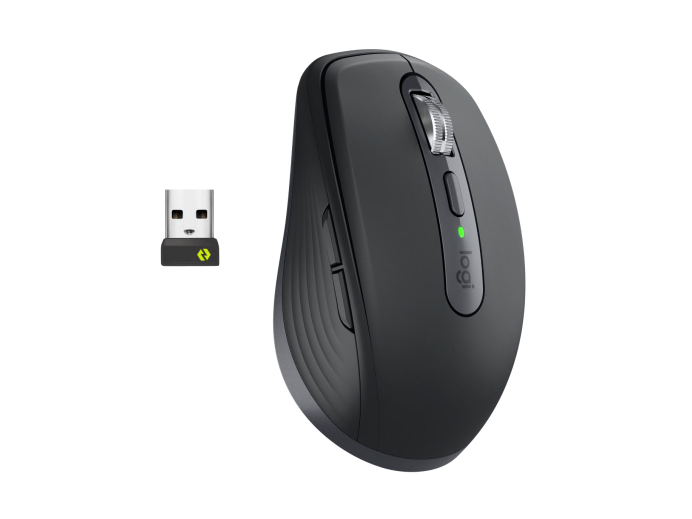
The Logitech MX Anywhere 3S is a refined iteration of the gold standard for portable mice. While it retains the iconic compact silhouette of its predecessor, the "S" upgrade introduces two critical features: a high-precision 8,000 DPI optical sensor capable of tracking on glass and "Quiet Click" buttons that reduce noise by 90%. Designed for professionals on the move, it features the legendary MagSpeed electromagnetic scroll wheel and seamless multi-device switching via Bluetooth or Logi Bolt.
Pros
- Quiet Click technology significantly reduces acoustic distractions
- 8,000 DPI optical sensor tracks flawlessly on glass and high-gloss surfaces
- MagSpeed Electromagnetic scrolling offers incredible speed and precision
- Compact, ergonomic design made with recycled post-consumer plastics
- Exceptional battery life with USB-C quick charging capabilities
Cons
- Does not include a Logi Bolt USB receiver in the box
- Lack of dedicated horizontal scroll tilt on the wheel
- Size may be too small for users with large hands using a palm grip
- Internal battery is not user-replaceable
- Limited number of customizable physical buttons compared to the MX Master 3S
The Logitech MX Anywhere 3S is a refined iteration of the gold standard for portable mice. While it retains the iconic compact silhouette of its predecessor, the "S" upgrade introduces two critical features: a high-precision 8,000 DPI optical sensor capable of tracking on glass and "Quiet Click" buttons that reduce noise by 90%. Designed for professionals on the move, it features the legendary MagSpeed electromagnetic scroll wheel and seamless multi-device switching via Bluetooth or Logi Bolt.
Design and build quality
The Logitech MX Anywhere 3S is a masterclass in industrial design, managing to feel both rugged and refined. It retains the low-profile, ambidextrous shape of its predecessor, making it easy to slip into a laptop sleeve or even a pocket. The build quality is immediately apparent; despite its small size, the mouse has a reassuring heft that prevents it from feeling like a cheap plastic peripheral. The top casing is smooth, while the sides feature silicone grips with a machined texture that provides a secure hold even during long sessions. One of the standout physical features is the MagSpeed scroll wheel, machined from solid steel. It provides a tactile, premium experience that is unmatched in the portable mouse category. Furthermore, Logitech’s commitment to sustainability is evident here, with the graphite model utilizing 78% recycled plastic, ensuring that the device is as eco-friendly as it is functional.
Performance in real use
In real-world testing, the headline feature—the 8,000 DPI sensor—proves to be more than just a marketing gimmick. For users on high-resolution 4K or 5K monitors, the higher sensitivity allows for effortless navigation across vast digital workspaces with minimal physical movement. Perhaps more importantly for a travel mouse, the Darkfield tracking technology is phenomenal. It handles clear glass, polished stone, and rough fabric with equal aplomb, meaning you never need to carry a mousepad. The transition to "Quiet Clicks" is the other major performance shift. Unlike the sharp, tactile 'snap' of the previous model, the 3S offers a soft, damped thud. While it loses a bit of that aggressive mechanical feedback, the trade-off is a significantly more professional atmosphere in quiet environments, allowing you to work in a meeting or a quiet cafe without drawing glares from neighbors.
Ease of use
Setup is nearly instantaneous via Bluetooth, and the integration with the Logi Options+ software is where the mouse truly shines. The software allows for deep customization, including "Smart Actions" which are essentially macros that can automate complex tasks with a single button press. The MagSpeed wheel is another win for ease of use; it can spin freely at 1,000 lines per second or stay in a ratcheted "Line-by-Line" mode for precision. The mouse intelligently switches between these modes based on how fast you flick the wheel. Navigating through massive Excel spreadsheets or long web articles becomes second nature. Additionally, the side buttons are perfectly placed for the thumb, providing easy "Back" and "Forward" navigation, though they can also be remapped for app-specific functions like muting a microphone in Zoom or undoing an action in Photoshop.
Reliability
Logitech’s MX line has a reputation for longevity, and the 3S feels built to uphold that legacy. The battery life is rated for up to 70 days on a single full charge, and in practice, this seems accurate. A quick three-minute charge via the front-facing USB-C port provides enough power for a full day of work, which is a lifesaver for mobile professionals. While the lack of a Logi Bolt receiver in the box is an annoyance for those who prefer 2.4GHz wireless over Bluetooth, the Bluetooth connection itself has proven to be incredibly stable, even in interference-heavy environments like airports. The software remains stable on both Windows and macOS, and the "Flow" feature—allowing you to move your cursor and even copy-paste files between different computers—works with surprising reliability.
Use Cases
The MX Anywhere 3S is the ultimate "digital nomad" tool. It excels in environments where space is at a premium. Its compact size makes it ideal for airplane tray tables or small coffee shop setups. For creative professionals, the precision of the 8K sensor makes it a viable tool for photo editing or vector work on the go. It’s also an excellent secondary mouse for users who have an MX Master 3S at their main desk but want a consistent software experience when they travel. Because it can pair with up to three devices and switch between them at the press of a button, it’s also a great fit for users who toggle between a laptop, a tablet, and a home media PC.
Long term ownership feedback
Long-term users of the MX Anywhere series often point to the durability of the scroll wheel and the resilience of the sensor as key highlights. Early feedback on the 3S suggests that the new silent switches are holding up well without developing the "double-click" issues that plagued older mechanical mouse designs. One minor concern for long-term ownership is the silicone side grips; on previous models, these could eventually show signs of wear or staining after years of heavy use, though the 3S grips feel slightly denser and more resistant. Overall, the MX Anywhere 3S represents a low-maintenance, high-reliability investment for anyone who views their mouse as a critical piece of professional infrastructure. It is a tool that stays out of the way and just works, which is perhaps the highest praise one can give a productivity peripheral.
| Specification | Details |
|---|---|
| Sensor | Darkfield laser, 400-8000 DPI [^1_8][^1_2] |
| Connectivity | Bluetooth 5.1, Logi Bolt receiver (sold separately) [^1_9][^1_2] |
| Buttons | 6 programmable (Left/Right, Middle, Mode Shift, Forward/Back) [^1_8][^1_2] |
| Battery Life | Up to 70 days, 3 hours from 1-minute charge [^1_8][^1_1] |
| Weight | 95g with battery [^1_8][^1_2] |
| Dimensions | 100.5mm × 65mm × 34.4mm [^1_8][^1_2] |
| Polling Rate | 125Hz (Bluetooth) [^1_2] |
| Durability | 10 million clicks (left/right buttons) [^1_8] |
| Charging | USB-C, 2 hours full charge [^1_8][^1_1] |
| Multi-Device | Supports 3 simultaneous connections [^1_1][^1_2] |
| Compatibility | Windows, macOS, iPadOS, ChromeOS, Linux [^1_8][^1_2] |
| Materials | Recycled plastic construction [^1_2] |
Buy
- You frequently work in quiet environments like libraries or shared offices where click noise is a concern
- Your workflow involves using multiple computers simultaneously via Logitech Flow
- You need a mouse that can track on difficult surfaces like glass coffee tables or hotel desks
- Portability is your top priority without sacrificing high-end sensor performance
- You prefer a mouse with a heavy, premium-feeling metal scroll wheel in a small form factor
Skip
- You have large hands and prefer a full-sized ergonomic mouse for all-day comfort
- You rely heavily on a physical USB receiver and don't want to purchase a Bolt dongle separately
- Your work requires a dedicated thumb wheel for horizontal scrolling
- You are a competitive gamer who needs a dedicated high-polling rate gaming mouse
- You already own the MX Anywhere 3 and don't find click noise or 4K DPI limits to be an issue
Critic Reviews
No reviews yet.
User Reviews
No reviews yet.