
Logitech Signature M650: The Silent Productivity Hero for Every Hand Size
Tired of "one-size-fits-all" mice that leave your hand cramped? The Logitech M650 delivers tailored ergonomics, silent clicks, and smart scrolling for a seamless workflow.
Updated February 8, 2026
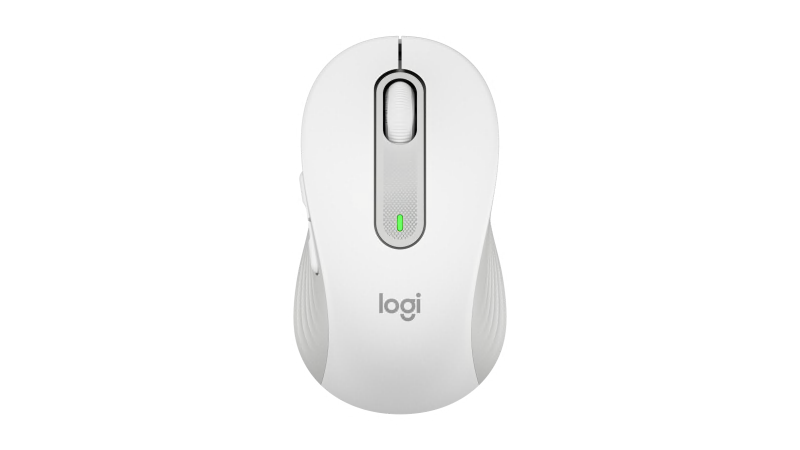
The Logitech Signature M650 redefines the mid-range productivity mouse by focusing on personalization and core tactile experience. Available in three distinct sizes—including a dedicated left-handed version—it features the innovative SmartWheel for precision and speed, alongside SilentTouch technology that reduces click noise by 90%. While it lacks the multi-device pairing of the flagship MX series, its 24-month battery life and robust Logi Bolt connectivity make it an unbeatable choice for focused office work and home setups.
Pros
- SmartWheel adaptive scrolling for precision or speed
- SilentTouch technology reduces click noise by 90%
- Available in regular, large (L), and left-handed versions
- Exceptional 24-month battery life on a single AA
- Robust Logi Bolt and Bluetooth Low Energy connectivity
Cons
- No multi-device easy-switch functionality
- Lacks a rechargeable internal battery (uses AA)
- No horizontal scroll wheel or tilt-wheel function
- Plastic construction feels less premium than MX series
- Limited customization compared to high-end gaming mice
The Logitech Signature M650 redefines the mid-range productivity mouse by focusing on personalization and core tactile experience. Available in three distinct sizes—including a dedicated left-handed version—it features the innovative SmartWheel for precision and speed, alongside SilentTouch technology that reduces click noise by 90%. While it lacks the multi-device pairing of the flagship MX series, its 24-month battery life and robust Logi Bolt connectivity make it an unbeatable choice for focused office work and home setups.
Design and Build Quality
The Logitech Signature M650 marks a departure from the "universal" design philosophy that often leaves users with either cramped fingers or an oversized grip. Logitech’s decision to release the M650 in three variations—Regular, Large (L), and a dedicated Left-handed model—is a masterclass in inclusive design. The build is predominantly high-quality recycled plastic, with the graphite and black models containing up to 64% post-consumer recycled material. While it lacks the cold, premium feel of the MX Master's machined aluminum, the M650 feels incredibly sturdy. The contoured shape is complemented by soft-touch rubber side grips with a subtle ribbed texture that ensures a secure hold even during long sessions. The aesthetics are professional yet approachable, fitting into a corporate boardroom as easily as a minimalist home office.
Performance in Real Use
The standout feature of the M650 is the SmartWheel. Unlike traditional scroll wheels that require a manual toggle to switch between notched and free-spinning modes, the SmartWheel uses a centrifugal clutch. Scroll slowly, and you feel the precision of every notch—perfect for navigating spreadsheets. Give it a sharp flick, and it enters a high-speed spin that lets you fly through hundreds of pages in seconds. In real-world testing, this transition is seamless and intuitive. Performance is further enhanced by the SilentTouch technology. In an era of open-plan offices and late-night remote work, the lack of a sharp, metallic "click" is a revelation. The buttons offer a damped, tactile feel that is satisfying to the user but virtually inaudible to someone sitting two feet away. The optical sensor is versatile, tracking accurately on wood, laminate, and most mousepads, though it struggles on glass.
Ease of Use
Setting up the M650 is a "plug-and-play" experience. It offers dual connectivity via Bluetooth Low Energy or the included Logi Bolt USB receiver, which provides a more secure, encrypted connection in busy wireless environments. The Logi Options+ software is the command center for this device. It allows users to remap the two side buttons to specific tasks like "Back/Forward," "Mute Microphone," or "Copy/Paste." The software is lightweight and provides helpful visualizations of battery life and DPI settings (ranging from 400 to 4000). The lack of a "Device Switch" button—found on the M720 or MX series—is the only notable hurdle in ease of use; the M650 is strictly a one-device-at-a-time tool.
Reliability
Reliability is where the M650 shines as a "utility" mouse. By opting for a single AA battery over a rechargeable lithium-ion cell, Logitech has achieved a staggering 24-month battery life. For most users, this means the mouse will work for two years without a single thought given to power. The connection via Logi Bolt is rock-solid, showing zero latency or dropouts even in areas saturated with 2.4GHz interference. The physical switches, while silent, feel durable enough to withstand several million clicks, suggesting a lifespan that matches its long battery cycle.
Use Cases
The M650 is the quintessential "all-rounder." It is perfectly suited for administrative professionals who live in Excel, students who need a quiet mouse for library sessions, and remote workers who want a reliable tool without the triple-digit price tag of enthusiast gear. The "Large" version is a particular boon for users with hand spans over 19cm who find standard mice uncomfortable. Conversely, the left-handed version is one of the few high-quality, non-symmetrical options available for southpaws in the current market.
Long-Term Ownership Feedback
Community consensus from platforms like Reddit and Amazon suggests that the M650 ages gracefully. Long-term users report that the rubber side grips do not "liquefy" or become sticky over time—a common complaint with cheaper rubberized coatings. The silent click mechanism remains consistent, and the SmartWheel doesn't lose its "flick" sensitivity after months of use. The most common critique from long-term owners is the longing for a horizontal scroll option, but most concede that for a secondary or "everyday" mouse, the M650’s simplicity is its greatest strength. It is a tool designed to disappear into the workflow, and by all accounts, it succeeds brilliantly.
- Core features
- SmartWheel, SilentTouch, Side Buttons
- Technical specifications
- 400-4000 DPI, 5 buttons, Logi Bolt/Bluetooth
- Compatibility
- Windows, macOS, iPadOS, ChromeOS, Linux, Android
- Materials
- Recycled plastic (up to 64% depending on color)
Buy
- You value a near-silent working environment for shared spaces
- You have struggled to find a mouse that fits larger hands or left-handed use
- You want a "set and forget" device with multi-year battery life
- Your workflow involves long documents requiring fast scrolling
- You need a secure wireless connection in a congested office
Skip
- You frequently switch between a laptop, tablet, and desktop
- You prefer the weight and texture of premium metal and rubber
- You are a power user who relies on 10+ programmable macros
- You travel light and prefer a slim, pebble-style portable mouse
- You specifically require USB-C recharging rather than disposable batteries
Critic Reviews
No reviews yet.
User Reviews
No reviews yet.